Navigation
Android Auto vs Android Automotive: Quick Answer
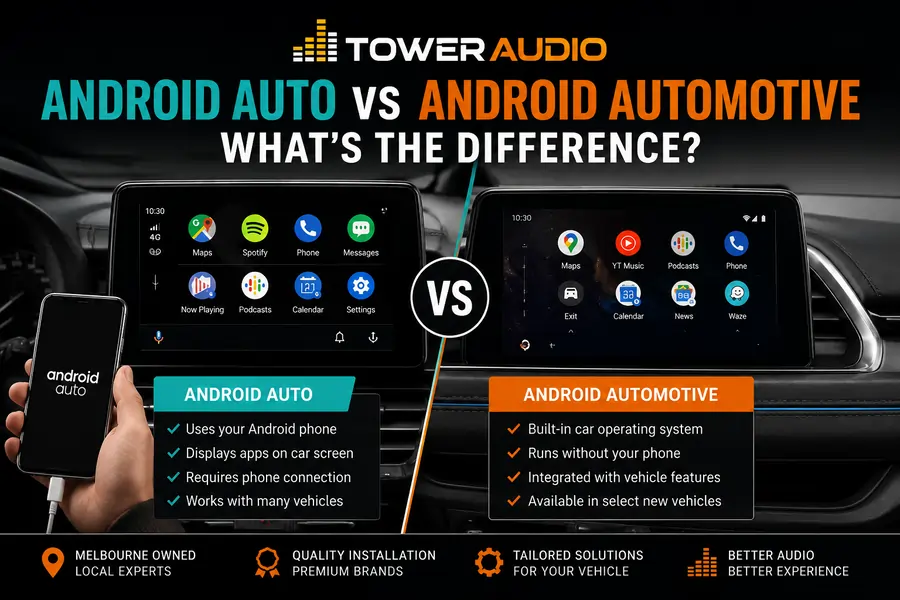
The simplest way to understand the difference is this: Android Auto belongs to your phone, while Android Automotive belongs to the car.
If you want to modernise an older vehicle with Google Maps, Spotify, calls, messages and voice control, Android Auto is usually the relevant upgrade. It can often be added through a compatible aftermarket head unit.
If a vehicle has Android Automotive, that system is normally installed by the car manufacturer. It is not usually something added later like a standard head unit upgrade.
Android Auto
Uses your Android phone and shows compatible apps on your vehicle display.
Android Automotive
Runs as the car’s own infotainment operating system without needing your phone.
Car Stereo Upgrade
Most older vehicles need an Android Auto compatible head unit, not Android Automotive.
Why This Difference Matters Before You Upgrade a Car Stereo
The difference matters because Android Auto can usually be added to an older car, while Android Automotive usually cannot. Many drivers search for Android Automotive thinking it is an upgrade product, but in most cases they actually need an Android Auto compatible head unit.
This is an important distinction for Melbourne vehicle owners with older Toyota, Ford, Hyundai, Mazda or Nissan models. If the factory stereo feels outdated, the practical upgrade is usually a replacement head unit that supports Android Auto and Apple CarPlay.
Android Automotive is more relevant when comparing new vehicles. It may already be built into the car, and the manufacturer controls the interface, app access, updates and deeper vehicle functions.
What Is Android Auto?
Android Auto is a phone-based system that connects your Android phone to a compatible car display. It lets you use selected apps through the vehicle screen, buttons, microphone and speakers.
Android Auto is popular because it keeps the experience familiar. Your maps, contacts, music, saved locations and voice assistant come from your phone, not from an old factory navigation system.
Common Android Auto features include:
- Google Maps navigation
- Waze navigation
- Spotify and music apps
- Phone calls
- Text message reading and voice replies
- Google Assistant voice control
- Calendar and destination prompts
Android Auto may work through a USB cable or wirelessly, depending on the head unit and phone. Wireless Android Auto is convenient, but wired Android Auto can still be reliable for drivers who prefer a stable connection and phone charging at the same time.
Problem
The factory stereo has old maps, weak Bluetooth or no modern app support.
Cause
The original infotainment system was designed before current phone integration became standard.
Fix
Install a compatible Android Auto head unit suited to the vehicle and dashboard layout.
What Is Android Automotive?
Android Automotive is a full operating system built into the vehicle by the manufacturer. It runs on the car’s infotainment hardware instead of being projected from your phone.
Depending on the vehicle, Android Automotive may support built-in maps, voice control, app downloads and vehicle settings. It may also connect with deeper vehicle features such as climate controls, charging information or system settings.
However, the experience depends heavily on the car manufacturer. Some systems include Google services. Others may use Android-based software without giving drivers the same app access they expect from Android Auto.
Built Into the Vehicle
The software runs directly inside the car’s infotainment system.
No Phone Required
Core infotainment features can work without connecting an Android phone.
Controlled by the Manufacturer
The car brand decides the interface, updates, app support and restrictions.
Android Auto vs Android Automotive: Main Differences
The main difference is where the system runs. Android Auto runs from your phone and appears on the car screen. Android Automotive runs inside the vehicle as the car’s own infotainment platform.
| Feature | Android Auto | Android Automotive |
|---|---|---|
| System type | Phone projection | Built-in vehicle operating system |
| Where it runs | On your Android phone | Inside the vehicle infotainment system |
| Phone required | Yes | No |
| Can be added to older cars | Yes, with a compatible head unit | Usually no |
| Best use case | Modernising an existing car | Factory infotainment in newer vehicles |
| App experience | Uses supported phone apps | Uses apps allowed by the vehicle system |
| Control over experience | Mostly controlled by your phone and Google | Mostly controlled by the car manufacturer |
| Common buyer confusion | People may think it is built into the car | People may think it is an aftermarket upgrade |
Which One Is Better?
Android Auto is usually better for drivers upgrading a current vehicle, while Android Automotive is more relevant when buying a newer car that already has it built in. The better choice depends on whether you are upgrading or comparing factory systems.
For many everyday drivers, Android Auto is the more practical option. It uses apps they already understand and keeps navigation, contacts and music tied to the phone they use every day.
Android Automotive can offer deeper integration, but it can also limit driver choice if the manufacturer controls too much of the system. Some drivers prefer phone projection because it feels familiar and is easier to replace when they change vehicles.
Choose Android Auto If
You want to add Google Maps, calls, music and messages to an existing car.
Choose Android Automotive If
You are buying a newer vehicle with a strong built-in infotainment system.
Be Careful If
A new car removes phone projection and forces you to use only the factory system.
What This Means for Car Stereo and Head Unit Upgrades
For most Tower Audio customers, Android Auto is the upgrade that matters. If your car does not already have modern smartphone integration, a compatible head unit can often add Android Auto, Apple CarPlay, Bluetooth, reverse camera support and improved audio control.
This can be a practical upgrade for vehicles with:
- No touchscreen
- Old factory navigation
- Poor Bluetooth connection
- No Android Auto or Apple CarPlay
- A small or dated factory display
- A damaged or unreliable stereo unit
- Limited reverse camera compatibility
The correct head unit depends on the vehicle. A clean installation should consider the dashboard shape, factory plugs, steering wheel controls, camera retention, speaker setup, amplifier integration and whether the driver wants wired or wireless Android Auto.
Want Android Auto Added to Your Car?
Tower Audio installs Android Auto compatible head units for Melbourne drivers who want modern navigation, phone connection and better in-car usability.
Android Auto Installation Melbourne
Head Unit Installation Melbourne
What Melbourne Drivers Should Know
Melbourne drivers upgrading an older car should usually focus on Android Auto compatibility, not Android Automotive. Android Auto can make a reliable older vehicle feel more current without needing to replace the car.
This is especially useful for daily driving around Melbourne, where current maps, traffic updates, hands-free calls and simple music control can make the car easier to live with.
Android Auto upgrades are commonly relevant for vehicles such as:
- Toyota Hilux
- Toyota LandCruiser
- Toyota Prado
- Ford Ranger
- Hyundai i30
- Mazda CX-5
- Nissan Navara
- Nissan Patrol
For these vehicles, the main decision is not Android Auto versus Android Automotive. The real decision is which head unit, fascia kit, wiring solution and installation approach will give the cleanest result.
Android Auto vs Android Automotive: Which Should You Care About?
If you are upgrading your current car, care about Android Auto. If you are buying a newer car, check whether it has Android Auto, Android Automotive, or both.
Before upgrading or buying, ask these questions:
- Does the system support Android Auto?
- Is Android Auto wired, wireless or both?
- Does it also support Apple CarPlay?
- Can the factory reverse camera be retained?
- Will steering wheel controls still work?
- Will the head unit fit cleanly into the dash?
- Will the system suit the existing speakers and amplifier?
- Will the interface be simple enough for daily use?
FAQs
Is Android Automotive the same as Android Auto?
No. Android Auto displays compatible apps from your Android phone on the vehicle screen. Android Automotive is built into the car and runs as the vehicle’s own infotainment operating system.
Which one do I need for an older car?
For an older car, you usually need Android Auto through a compatible aftermarket head unit. Android Automotive is usually not installed as a normal aftermarket upgrade.
Can Android Auto be installed in any car?
Android Auto can be installed in many vehicles, but not every car uses the same parts. The installer needs to check the dash layout, wiring, factory camera, steering wheel controls and audio system.
Does Android Auto need a phone?
Yes. Android Auto needs an Android phone connected to a compatible head unit by USB cable or wirelessly if the system supports it.
Does Android Automotive need a phone?
No. Android Automotive can run without a phone because it is installed directly in the vehicle’s infotainment system.
Is wireless Android Auto better than wired Android Auto?
Wireless Android Auto is more convenient because you do not need to plug in every time. Wired Android Auto can still be a good choice if you want a stable connection and phone charging while driving.
Is Android Auto worth installing?
Yes, Android Auto is worth installing if your car has old maps, poor Bluetooth, no touchscreen or no modern smartphone connection. It can improve navigation, calls, music and daily usability.
Can Tower Audio install Android Auto in my car?
Yes. Tower Audio installs Android Auto compatible head units for many Melbourne vehicles. The right option depends on your vehicle model, existing stereo, camera setup, steering wheel controls and desired features.